
Automating Linux User Management with a Bash Script
In this lab, you will build a user management script that asks for a username, creates the user, sets a password, and assigns the user to a group. The goal is to learn how Bash reads user input and uses it to run system commands automatically.
I. Setting Up
Create a new file and make it executable.
touch user_setup.sh
chmod +x user_setup.sh
Open the file and add this at the top.
#!/bin/bashThis tells the OS which program should run the script.
II. Printing Output With echo
The first thing the script does is print a message to the terminal. Add this block.
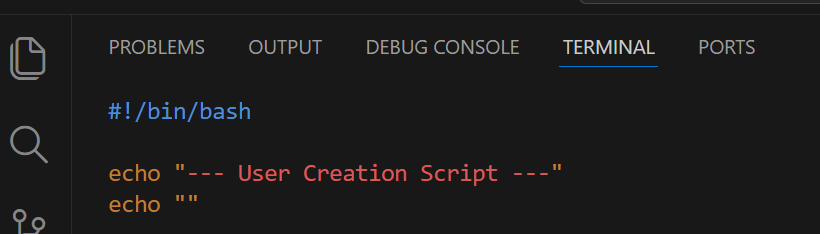
echo takes the text you give it and prints it to the terminal. Each echo prints one line. echo "" prints a blank line.
echo "some text"→ prints that textecho ""→ prints a blank line
III. Reading Input With read
Now the script needs to ask the user for a username. Add this below the banner.

The script stops and waits. When the user types something and presses Enter, that value is stored in the variable username.
read→ stops the script and waits for keyboard input-p→ prints a message on the same line before waitingusername→ the variable that stores what was typed
IV. Validating the Input
The user could press Enter without typing anything. The script needs to catch that.

if→ starts the condition check[[ ... ]]→ is where the condition goes-z "$username"→ the condition being checkedthen→ runs if the condition is truefi→ closes the if block-zchecks if a string is empty. If the variable holds nothing, the condition is true and the script prints the error and stops.-z "$username"→ true ifusernameis emptyexit 1→ stops the script and signals that something went wrong
V. Creating the User
Now the script uses the username to create a new system user.
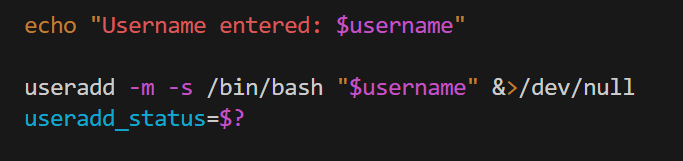
useradd creates the user and sets up a home directory. After every command runs, the shell stores its result in $?. That result is called an exit code. The exit code tells the script whether the command succeeded or failed. 0 means the command succeeded. Any other number means something went wrong.
The problem with $? is that it gets overwritten every time a new command runs. That is why the script saves it to useradd_status right away. That way the value is not lost before the script has a chance to check it.
What &>/dev/null does:
By default, useradd prints its own messages to the terminal. &>/dev/null redirects all of that output away so the terminal stays clean. The script handles all messages itself using echo.
&>→ redirects both regular output and error output/dev/null→ a special file that discards everything sent to it
Now check the exit code and print the right message.
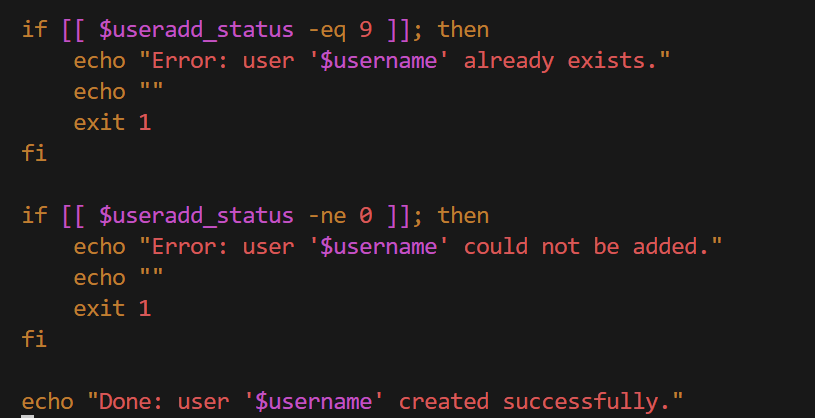
The script checks the exit code and prints the right message for each case. Exit code 9 means the user already exists. The script catches that specific case and prints a clear message. Any other non-zero code prints a general error. If neither condition is true, it means the exit code was 0 and the command succeeded, so the script reaches the echo "Done" line and prints the success message.
VI. Setting a Password
Add the password section below.
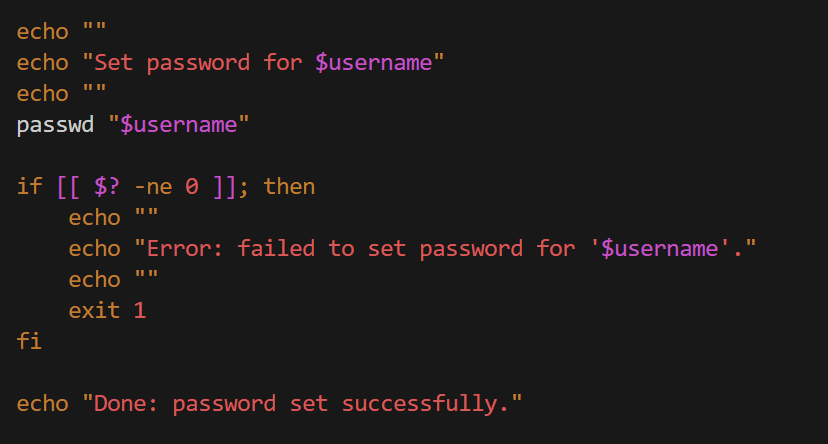
passwd takes over the terminal, prints its own prompts, reads the input directly, and returns when it is done. The script just calls it and waits. If the user types two different passwords, passwd returns a non-zero exit code and the script prints the error and stops.
VII. Assigning a Group
The script needs to ask for a group to add the user to. This is the same pattern as the username.
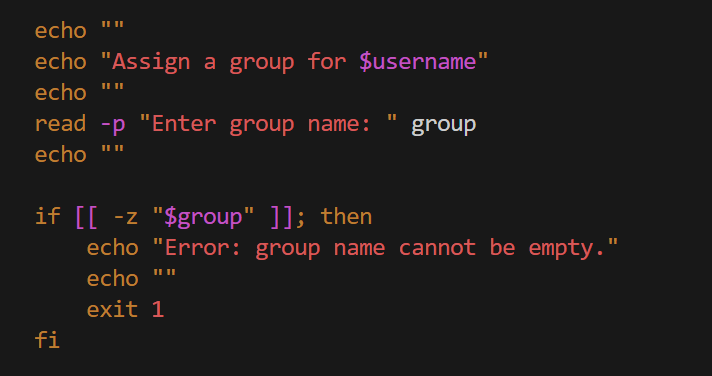
Now check if the group exists before trying to add the user to it.

getent group "$group" checks if the group exists in the system. The output is discarded with > /dev/null because only the exit code matters. The ! in front of getent flips the result. So instead of running the block when the command succeeds, the script runs it when the command fails, meaning when the group is not found. If the group is not found, the script creates it and prints a message.
Now add the user to the group.
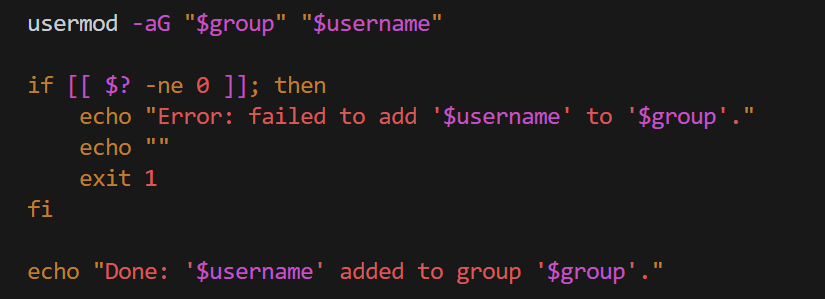
usermod modifies an existing user. -aG tells it to add the user to the group specified by "$group" without removing them from any group they already belong to. Without -a, the user loses all current group memberships.
After usermod runs, the script checks $? immediately. If the exit code is not 0, something went wrong and the script prints the error and stops. If the exit code is 0, the script reaches the echo "Done" line and prints the success message.
VIII. Printing a Summary
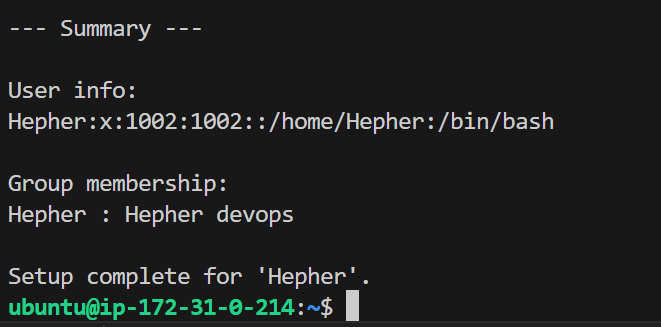
At the end, the script prints a summary of what was created.
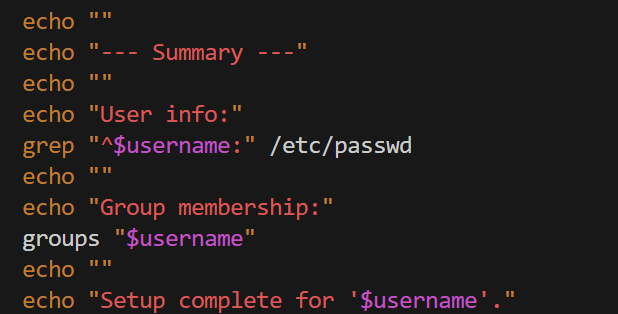
grep reads /etc/passwd and prints the user’s entry. groups prints every group the user belongs to. Both commands print their output directly to the terminal, the same way echo does.
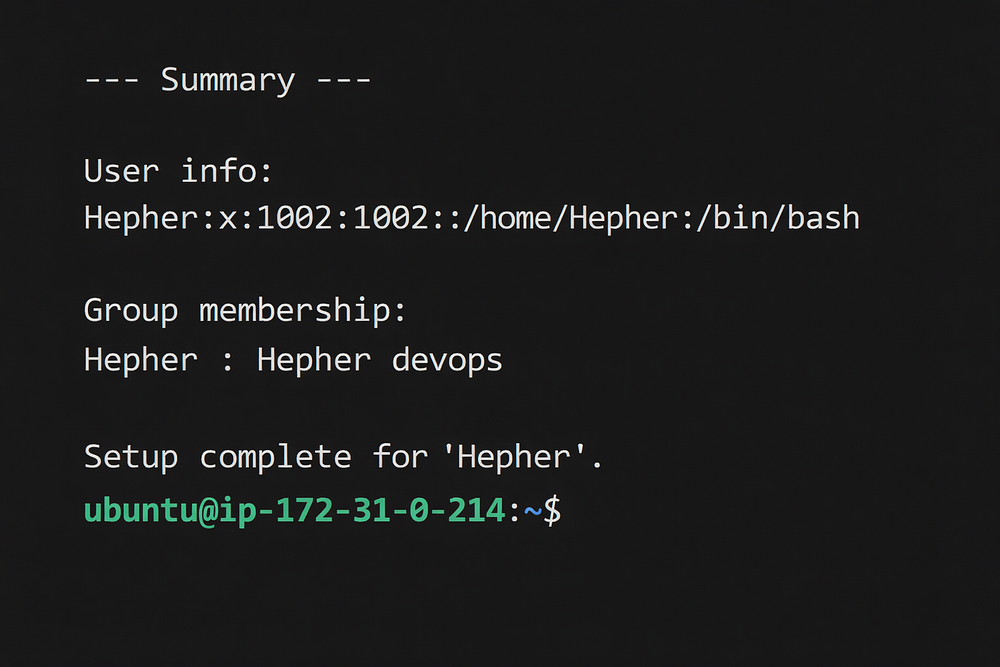
When you run the full script, the final output looks like this.
IX. What This Lab Covered
echo prints output to the terminal.
Each echo prints one line. Use echo "" to print a blank line. Use $variablename inside quotes to print the value of a variable.
read captures keyboard input.
The -p flag shows a prompt on the same line. The value is stored in a variable and can be used anywhere in the script after that.
Always validate input before using it.
Use -z to check if a variable is empty. Print a clear error with echo and stop the script with exit 1.
Commands produce exit codes.
Every command returns a number in $?. Zero means success. Save it immediately before another command overwrites it. Use echo to print the right message based on what that number is.
X. Full Script
#!/bin/bash
#Author Hepher Ossounga

echo "--- User Creation Script ---"
echo ""
read -p "Enter new username: " username
echo ""

if [[ -z "$username" ]]; then
    echo "Error: username cannot be empty."
    echo ""
    exit 1
fi

echo "Username entered: $username"

useradd -m -s /bin/bash "$username" &>/dev/null
useradd_status=$?

if [[ $useradd_status -eq 9 ]]; then
    echo "Error: user '$username' already exists."
    echo ""
    exit 1
fi

if [[ $useradd_status -ne 0 ]]; then
    echo "Error: user '$username' could not be added."
    echo ""
    exit 1
fi

echo "Done: user '$username' created successfully."
echo ""

echo "Set password for $username"
echo ""

passwd "$username"
if [[ $? -ne 0 ]]; then
    echo ""
    echo "Error: failed to set password for '$username'."
    echo ""
    exit 1
fi

echo "Done: password set successfully."
echo ""

echo "Assign a group for $username"
echo ""

read -p "Enter group name: " group
echo ""

if [[ -z "$group" ]]; then
    echo "Error: group name cannot be empty."
    echo ""
    exit 1
fi

if ! getent group "$group" > /dev/null; then
    echo "Group '$group' not found. Creating it..."
    groupadd "$group"
    echo "Done: group '$group' created."
    echo ""
fi

usermod -aG "$group" "$username"
if [[ $? -ne 0 ]]; then
    echo "Error: failed to add '$username' to '$group'."
    echo ""
    exit 1
fi

echo "Done: '$username' added to group '$group'."
echo ""

echo "--- Summary ---"
echo ""

echo "User info:"
grep "^$username:" /etc/passwd
echo ""

echo "Group membership:"
groups "$username"
echo ""

echo "Setup complete for '$username'."